Some of the Best GTA San Andreas Cheats for Mobile
Is It Cool to Use GTA San Andreas Cheats for Mobile?
Let’s talk about the elephant in the room – video game cheats. The vast majority of the global gaming community finds cheats immoral. But only when cheaters interrupt or ruin other gamers’ experience to benefit from online PvP battles or gain some illegal experience. However, if you use cheats for your fun in a gaming session that doesn’t involve other players, it is okay. Especially when it comes to playing your favorite games — in such a way, you can explore more of the core gameplay mechanics in the game that you have already beaten a few times. That is why today we decided to review some of the best GTA San Andreas cheats for mobile, as many modern gamers play this title on handheld devices.
How Do You Install GTA San Andreas Cheats for Mobile?
Grand Theft Auto: San Andreas is one of the most iconic games in the GTA series about the incredible adventures of Carl “CJ” Johnson. While you are waiting for the release of GTA VI, remember the classic title with the expansive open-world experience. This gaming experience captivated the hearts and minds (and so many hours) of players across various platforms, including mobile devices on Android and iOS.

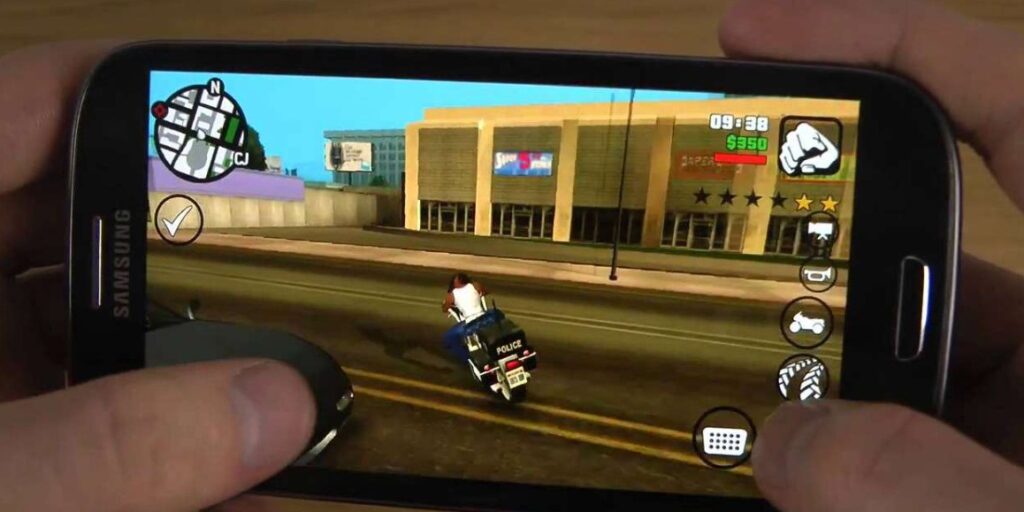
The mobile version of vanilla GTA San Andreas (not the Definitive Edition’s abomination) was released in 2013. Players could play this legendary game after getting the legal installation files from apkbomb.com and setting them up on handheld devices. It is much funnier to explore the vast world of San Andreas on the go.
One thing that makes this game so appealing is its extensive list of official GTA San Andreas mobile cheat codes that will greatly improve gameplay. Players can get the abilities, vehicles, and other benefits like infinite health and ammo.
To install GTA San Andreas cheat codes on a mobile device with Android OS, you need to set up the game first. Finding and downloading the APK file that is suitable for modding and cheating is the first step.
Step 1: Download and Install the APK file
- An APK and OBB file for GTA San Andreas can be downloaded from a reliable APK site with malware-free content like APKBomb. Make sure your device has enough storage space (about 1.5 GB for the game, and the OBB file);
- Once done, open the GTA San Andreas APK file and install it as instructed on the website;
- If your device doesn’t allow installations from unknown sources, go to Settings > Security > Unknown Sources and enable it;
- To extract an OBB file, you use an app like ZArchiver;
- Then just extract it to the Android/obb/com.rockstargames.gtasa directory;
Step 2: Launch GTA San Andreas
- Open GTA San Andreas from your app folder;
- Allow necessary permissions when prompted;

How to Use GTA San Andreas Cheats on Mobile After Installation?
If you want to use cheat codes in GTA San Andreas for mobile, you actually need to enable the cheat codes when playing in the game. The mobile version does not allow you to enter cheats directly as in the console versions. Instead, you can use mods or third-party apps to enable cheats – methods like this will require root access or mod installations.
1) Install CLEO Mod:
- Find the CLEO-enabled version of the GTA San Andreas file in the APK format from a trusted modding website;
- This mod uses version 2 of the modded APK installer system. Follow the installation instructions given along with it – you need to rename the cache folders and reinstall the modded APK;
2) Add Cheat Scripts:
Copy and download CLEO scripts that include the cheats you want (the cheat scripts don’t come built into CLEO. There is an Uncensored version, for example, where the scripts for infinite health and invincibility are pre-installed). To put these scripts in, put them in the Android/data/com.rockstargames.gtasa directory.
3) Activate Cheats:
- Get into your GTA San Andreas game and activate the cheats through the CLEO menu (usually initiated by a button combo key (check mod instructions if it does not work properly on your PC);
- To open the main menu, tap the mini-map on the top left side of the screen;
- Choose the choices on the left and go to the “Options” menu;
- Go to the top of the screen and choose the “Accessibility” tab;
- Next, scroll down and click “Enter Cheat Code” You will then see a keyboard to type the cheat code;
Important! GTA San Andreas cheats for mobile will keep players from getting achievements. Before using cheats, save the game first and have a clean save file backup.

Top 6 GTA San Andreas Cheats on Mobile Devices
First and foremost, you need to remember that you need to activate cheat codes for GTA San Andreas on mobile devices with Android or iOS (if the Apple device is jailbroken – not recommended). We’ve covered earlier the steps. When everything is ready you have to type the cheat codes that tweak the game and give you the in-game benefits.
- Full Health, Armor, and Money. The cheat code you need to type is PJYNQCQ
This cheat gives the player full health, full armor, and a lot of cash ($ 250,000). It’s especially useful for missions where you want health and armor as well as funding to spend on properties or vehicles.
This cheat is great for GTA San Andreas players to not bother about the health or cash of the players while focusing on completing the difficult missions. You can also experiment with different gameplay styles, and try out various weapons and vehicles without worrying you’ll lose your progress as you never run out of money.
- Complete Invincibility. The cheat code is GONPXWR
This cheat basically makes CJ almost invincible, taking out fall damage (except for armory fall) and explosions. For players who just want to explore the game’s world without the consistent fear of dying, it’s perfect.
Maximizing a player’s invincibility enables you to risk it by exploring risky areas or playing unsafe no matter what the losses are. Nevertheless, it can also hamper the game’s challenge and diminish the satisfaction of finishing a mission.

- Spawn Jetpack. The cheat code is ROCKETMAN
This cheat gives CJ jetpack to fly around San Andreas. The way to explore the game’s world from another perspective. The popular jetpack cheat gives players the opportunity to explore hard-to-reach areas or escape dangers in a matter of seconds.
- Spawn Hydra. The cheat code is JUMPJET
This cheat spawns a Hydra, the military jet CJ can pilot. And it provides a super fun way to explore the skies of San Andreas. The Hydra is also a powerful vehicle and a versatile one. Send it into a dogfight, or do a good old look around from the top down. It offers a military element without a truck.
- Infinite Ammo. The cheat code is FULLCLIP
This cheat allows CJ to perpetually equip infinity ammo for all weapons on the fly. This means you don’t need to keep an eye on ammo while navigating the deserts, and city centers, and eventually clinging to the vertical objects of the city.
Players receive complete freedom to concentrate on strategy and tactics instead of resource management. You can use more fluid and make intense shootouts or rapid cycling guns.
- Traffic Lights Always Green. The cheat code is ENQCFMA
This cheat makes sure all the traffic lights are green and takes traffic congestion down, making navigating the city much easier. Players can cut down the amount of time spent waiting at intersections. It is a sort of comic relief, as the unbelievable scenario of free-flowing traffic without stops.
Tips for Troubleshooting GTA San Andreas Cheats for Mobile:
- Make sure that your mods or your scripts are compatible with your game’s APK file. Also, if you have it modded, ensure that you aren’t breaking the terms of service for the one that makes the mods;
- Rooting your phone can be dangerous and some loaders may need you to do it, so you go at your risk. When installing or using mods, make sure to always use trusted sources and be cautious;
- The official mobile version doesn’t support the usual GTA San Andreas cheat codes on mobile like a console version. The primary interface for getting a cheat-like operation is through modding;

Frequently Asked Questions
How to install GTA San Andreas cheats on mobile iOS?
Installing GTA San Andreas cheats for mobile iOS is not so simple due to the closed iOS platform. In general, cheat codes are not available for official iOS users, as their device has to be jailbroken which is not recommended for security reasons.
However, with the Netflix version of GTA San Andreas users can access a cheat code menu directly through the game’s options which makes it easier to use the cheats without outside modifications. This method is safer and easier, as long as you have access to the Netflix Games tab and have a Netflix subscription to boot.
Is it possible to use GTA San Andreas Definitive Edition cheats on mobile?
The good news is that you can use GTA San Andreas Definitive Edition cheats on mobile while waiting for the release of the next Rockstar games (we look at you, Bully 2, and GTA VI). But the way you use them depends on how your device is set up and which version of the game you have.

Just like PC and console versions, player cheats are activated directly through the special game’s menu if you use the Android version (APK). Tap the cheats into the game via a keyboard or third-party keyboard app.
Also available as a Netflix version for Android and iOS, the Definitive Edition version makes it easy to use the GTA San Andreas mobile cheats through a menu in the game. iOS users to access cheat codes without having to jailbreak their devices. It’s this version with a cheat code menu, providing a convenient way to add cheats right in the game options.
Conclusion
The Asami Games team will continue to post interesting guides and tutorials for video game fans. Make sure to bookmark and follow our website to read this content made for you. Also, do not neglect this advice while they are active since the mobile modding always changes.