GeForce RTX 4090 DLSS 5 compatibility: what is actually known
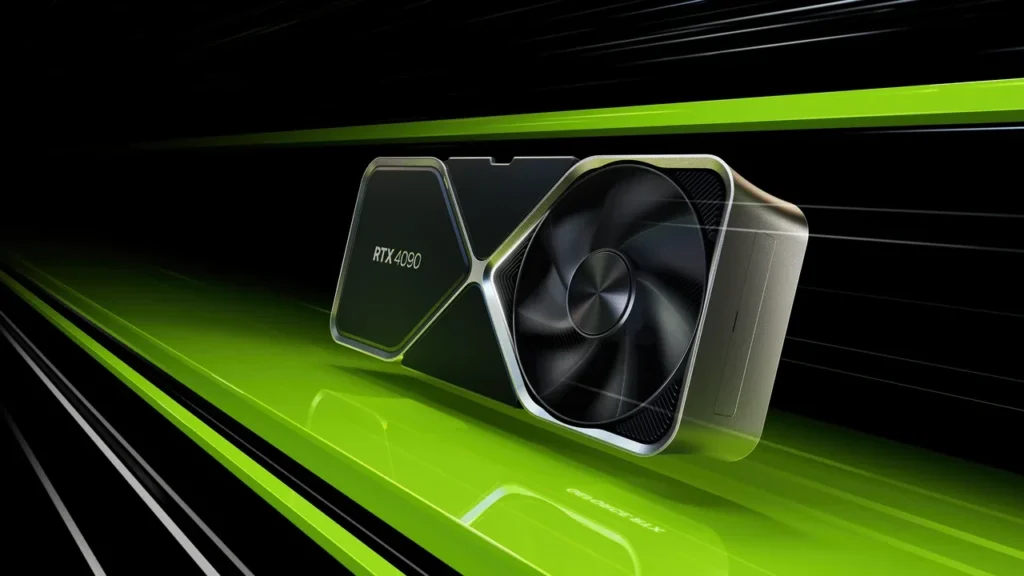
GeForce RTX 4090. Image credit: NVIDIA.
GeForce RTX 4090 DLSS 5 compatibility: where the situation stands right now
No official GeForce RTX 4090 DLSS 5 compatibility has been announced. NVIDIA still documents the desktop card as a DLSS 4.5 target, with Super Resolution, Ray Reconstruction, and Frame Generation. DLSS 5 remains tied to a launch announcement scheduled for 2026-09-03 at 21:00 PT. Before that announcement, anything presented as DLSS 5 on a desktop RTX 4090 is a research demo, a mislabeled mod, or speculation.
That distinction matters because the RTX 4090 remains the most common high-end NVIDIA GPU in studios today, as well as a familiar sight in QA racks and player rigs. Its support status affects build targets, certification profiles, marketing language, and hardware purchasing. For an Unreal Engine, Unity, or proprietary renderer project, the sensible production target is DLSS 4.5 until NVIDIA publishes something firmer.
What NVIDIA has said about RTX 40 support
NVIDIA has not published a DLSS 5 compatibility table, opened a public SDK channel, or issued driver notes exposing the feature on any RTX 40 GPU. Support claims made before 2026-09-03 at 21:00 PT are therefore unofficial.
If a milestone, roadmap commitment, or press demo falls on or after that time, check NVIDIA’s release notes and support matrix that day. For anything earlier, list the desktop RTX 4090 as a DLSS 4.5 target and DLSS 5 as unannounced.
Why there is no DLSS 5 switch yet
A game cannot turn DLSS 4.5 into DLSS 5 by changing one engine flag. The integration depends on NVIDIA’s runtime, a driver that exposes the feature, and the SDK or licence terms used by the shipping title. Without those pieces, Unreal Engine or Unity will receive a no-op or an error rather than a working new model.
DLSS feature levels normally arrive with a model file, parameter set, and version tag in NGX or Streamline. The runtime must know how to schedule that model. Hardware capability alone is not enough, and NVIDIA has not confirmed that RTX 40-series Tensor Cores are the intended execution platform for DLSS 5.
The licence also defines which SKUs a studio may advertise, the minimum driver, and the feature names allowed in the UI. Enabling an unsupported option creates a mismatch between marketing and runtime behaviour, exactly the sort of issue certification should catch before release.
The current line between DLSS 4.5 and DLSS 5
DLSS 4.5 is the shipping limit on a desktop RTX 4090. Super Resolution reconstructs a higher-resolution image from a lower internal render. Ray Reconstruction replaces hand-written denoisers in ray-traced passes with a learned model. Frame Generation inserts an interpolated frame between two rendered frames. Those are the features a team can ship, test, and document today.
NVIDIA’s research material describes DLSS 5 as a different generation of learned model, with tighter links between scene rendering, upscaling, and frame interpolation. It does not disclose the exact architecture, runtime requirements, or supported GPUs in terms a studio can use as a contract. The scheduled announcement also suggests a defined product release rather than a silent driver rollout.
A DLSS 4.5 build can be certified and supported on the RTX 4090 with a normal driver dependency. A DLSS 5 build cannot be planned responsibly until the team has a public SDK, support matrix, feature checklist, and enough detail to write accurate marketing and known-issue notes.
Using the RTX 40 series as a hardware reference
The RTX 40 series entry records the Ada Lovelace generation, the RTX 4090’s AD102 die, memory configuration, Tensor Core count, and launch window. It does not claim DLSS 5 support. That agrees with NVIDIA’s current public position, although Wikipedia remains a cross-check rather than a vendor support document.
If a post, video, or forum reply says DLSS 5 already works on a desktop RTX 4090, compare it with NVIDIA’s release notes and the public hardware references. Without a vendor entry, the claim is ahead of the official record and should not drive engineering work.
The RTX 4090 will remain relevant even if a later DLSS release covers more GPUs. It is widely used in studios and by early-access players, so its verified feature limit belongs in the full hardware matrix.
How the engine integration behaves
An Unreal Engine 5, Unity, or proprietary project typically links Streamline or NGX, selects features in project settings or configuration, and loads a local model plus a driver-provided feature version. If the model is absent or the driver does not support the card, the runtime falls back to a software upscaler or does nothing. The public interface has no “force DLSS 5 on any GPU” option.
For the desktop RTX 4090, use DLSS 4.5 Super Resolution in Quality or Performance mode, enable Ray Reconstruction for suitable ray-traced reflections or global illumination, and turn on Frame Generation only after measuring latency and frame-time cost. QA can validate that configuration, certification can accept it, and support staff can explain it.
A project releasing after 2026-09-03 may keep a guarded DLSS 5 path in source control. Leave it off by default and require valid checks for the driver version, GPU model, and reported feature before enabling it. This is the same defensive pattern used for earlier DLSS upgrades.
A feature checklist for current builds
This table separates features that are officially available on the desktop RTX 4090 from the research-stage option that should stay out of public feature lists.
| Feature | Public status on GeForce RTX 4090 | Safe to ship in current build | Notes for the team |
|---|---|---|---|
| DLSS Super Resolution (DLSS 4.5) | Officially supported | Yes | Use the Quality, Balanced, or Performance preset that matches the target frame time. |
| DLSS Ray Reconstruction (DLSS 4.5) | Officially supported | Yes | Confirm coverage for each ray-traced pass; some passes may still need a hand-written denoiser fallback. |
| DLSS Frame Generation (DLSS 4.5) | Officially supported | Yes, with input-lag testing | Measure end-to-end latency in motion-to-photon and in aim trainers before locking the default. |
| DLSS 5 (next generation) | Not officially supported on GeForce RTX 4090 | No | Do not advertise, do not enable by default, keep the integration as a guarded feature behind a runtime check. |
| Path Tracing with DLSS 4.5 | Officially supported | Yes, on a per-scene basis | Pair with Ray Reconstruction; budget the extra cost of path-traced bounces. |
Recheck every row after the 2026-09-03 announcement. Only NVIDIA’s published support matrix can confirm which feature is exposed on a given GPU.
What changes when the SDK arrives
A matching support matrix and SDK let the studio update its feature list, allow the guarded engine path to return true on supported hardware, and give QA a real target for screenshots, traces, and known issues. Until all of that exists, the RTX 4090 remains a DLSS 4.5 target.
Read the feature version from the NVIDIA runtime and display it in the settings panel. A placeholder such as “Neural Rendering” or “Next-Generation Upscaling” may exist internally, but hide or disable it when the runtime check fails. Players should see the loaded feature, not a marketing guess.
Update the studio handbook on the day the SDK lands. Keep supported GPUs, minimum driver versions, and per-SKU flags in one ticket with a named owner so the documentation cannot drift from the build for a release cycle.
Responsibilities across the team
- Engine programmer: keep the integration behind a runtime check, expose the feature version, and read it from NVIDIA’s runtime instead of a hard-coded marketing name.
- Technical artist: tune presets per scene. Quality at 4K is not evidence that Performance will look acceptable on a 1440p ultrawide. Recheck after engine and runtime updates.
- Producer: do not approve “supports DLSS 5 on GeForce RTX 4090” without an NVIDIA announcement, support matrix, and public SDK.
- QA lead: record the desktop RTX 4090 as a DLSS 4.5 target with a known driver baseline, leaving DLSS 5 out of scope until the matrix changes.
- Marketing or community lead: keep DLSS 5 out of posts, press kits, and store pages until the SDK and support matrix are public. Point questions to NVIDIA’s official page and release timing.
Those roles cover the code, art, QA, publishing, and support decisions that must stay in sync.
Edge cases worth testing
NVIDIA’s DLSS 5 page comes from the Applied Deep Learning Research team. It is useful for terminology and research direction, but it is not a product support matrix and does not make the desktop RTX 4090 a supported SKU.
The driver may expose an internal feature name that differs from the marketing label, so the UI and logs should use the runtime version. A mod or leaked SDK may also load on the RTX 4090, but it remains unsupported and should stay out of signed builds. When an artifact looks like an upscaling fault, reproduce it on a clean driver with DLSS off, with DLSS 4.5, and with DLSS 4.5 plus Ray Reconstruction. Path tracing or tonemapping can cause similar symptoms.
If a certification lab asks for evidence, provide NVIDIA’s support matrix, the minimum driver from the readme, and a settings screenshot showing the version string. Keep those files with the build to avoid another certification exchange.
This guidance applies to the desktop RTX 4090. Laptop, Max-Q, and neighbouring SKUs have separate support paths, so release notes and settings must name the exact model.
Performance, latency, and frame-time limits
Public material does not provide enough information to estimate DLSS 5 performance on a desktop RTX 4090. Internal resolution, active ray-traced passes, the loaded model, and Frame Generation all change the budget. Without a published model, feature version, and support matrix, no exact frame time can be defended.
The current build can still use a 4K DLSS 4.5 budget. These values are placeholders, not benchmarks, and must be replaced with profiler data. No verified exact-model FPS result for the desktop RTX 4090 was supplied for this campaign.
| Render preset | Internal render target | Output target | Frame Generation | Working frame budget (placeholder) |
|---|---|---|---|---|
| DLSS 4.5 Quality | 2560 x 1440 | 3840 x 2160 | Off | Set per project after profiling. |
| DLSS 4.5 Quality | 2560 x 1440 | 3840 x 2160 | On | Set per project after input-lag testing. |
| DLSS 4.5 Performance | 1920 x 1080 | 3840 x 2160 | Off | Set per project after profiling. |
| DLSS 4.5 Performance | 1920 x 1080 | 3840 x 2160 | On | Set per project after input-lag testing. |
| DLSS 4.5 Balanced | 2240 x 1260 | 3840 x 2160 | On or Off | Set per project after profiling. |
Record internal resolution, output resolution, Frame Generation state, and frame budget together. Changing one while omitting the others produces inconsistent reports. Add a DLSS 5 row only after the public SDK and support matrix exist.
Keeping player-facing claims accurate
The store page and settings panel should name the same supported version. Before the 2026-09-03 announcement, community replies should say that NVIDIA’s current matrix does not list DLSS 5 for a desktop RTX 4090. Afterward, quote the published matrix rather than paraphrasing it loosely.
Press material should also wait. A future DLSS version without a support matrix is a wager on another company’s announcement, and being wrong costs more than publishing the claim later. A studio may discuss its work with NVIDIA tools without naming an unsupported version.
Tests for the next sprint
- Read the NVIDIA runtime version on a clean driver and confirm that the settings panel shows the same value.
- Run upscaling and Frame Generation on the main branch, recording frame time, internal render target, and output target for every preset.
- Run ray-traced scenes with Ray Reconstruction on and off, recording visual and performance differences.
- Capture the settings panel on a desktop RTX 4090 and store the image with the build’s known-issue material.
- Create one SDK-upgrade ticket, assign an engineer, and leave it blocked until the public matrix and SDK arrive.
This keeps the project ready to upgrade without changing its public claim early.
Risk for a small studio
A small team cannot absorb avoidable certification work or a false store-page claim. It should not promise a feature or SKU combination that NVIDIA has not published. The code can remain ready behind runtime checks while the public build stays on DLSS 4.5.
Publishers and platform holders are asking for the same honesty. Calling DLSS 4.5 the current limit makes the rest of the build’s claims easier to trust and support.
Frequently asked questions
Does the GeForce RTX 4090 support DLSS 5?
No official support has been announced. NVIDIA’s public material does not list the desktop RTX 4090, and the DLSS 5 announcement is scheduled for 2026-09-03 at 21:00 PT. Until a support matrix and SDK name the card, treat it as unsupported.
What is the highest DLSS version the RTX 4090 supports today?
DLSS 4.5 is the highest officially supported version. It includes Super Resolution, Ray Reconstruction, and Frame Generation. Show the runtime version in the settings panel rather than relying on a marketing label.
Could a future driver add DLSS 5 to the RTX 4090?
It could in principle, but NVIDIA has neither confirmed nor denied that route. Keep the code guarded and wait for the public SDK and support matrix before planning around it.
Is DLSS 5 the same as DLSS 4.5 with Frame Generation?
No. NVIDIA documents them as separate generations. Enabling DLSS 4.5 Frame Generation does not turn a build into a DLSS 5 build, and the distinction matters in marketing, certification, and settings labels.
Should a studio advertise DLSS 5 support before NVIDIA’s announcement?
No. Keep any experimental path behind a runtime check and update the public claim only when NVIDIA publishes the SDK and matrix.
Will DLSS 5 reduce the cost of ray tracing on a GeForce RTX 4090?
Public information does not answer that. Internal resolution, bounce count, denoiser, and preset determine the cost. A developer cannot quote a real figure without a published model, feature version, support matrix, and measurements.
Does Frame Generation change when DLSS 5 ships?
Frame Generation is currently a DLSS 4.5 feature on the RTX 4090 and affects both input latency and frame-time planning. Wait for NVIDIA’s 2026-09-03 documentation before assuming the next generation changes that path. Keep its toggle separate from any future option.
What should a producer write in the next milestone review?
Record DLSS 4.5 as the current RTX 4090 limit, note NVIDIA’s DLSS 5 announcement date, assign the SDK upgrade to an engineer, and schedule a support-matrix review.
What should a player with a GeForce RTX 4090 do today?
Use DLSS 4.5 features in supported games, keep the driver and game current, and check the settings panel for the loaded version. Treat RTX 4090 DLSS 5 claims as unofficial until NVIDIA names the card.
Where can a developer read the official DLSS 5 information?
NVIDIA’s research site describes the Applied Deep Learning Research work and terminology. The scheduled 2026-09-03 announcement should provide the product support matrix, SDK, and GPU list.
Work to do on announcement day
On 2026-09-03, read the support matrix and SDK notes on a clean driver, then record the DLSS version, supported GPUs, minimum driver, and feature names. Update the store page, settings panel, press kit, support matrix, QA matrix, and certification checklist in one sprint with named owners.
Until then, the desktop RTX 4090 is officially a DLSS 4.5 target. DLSS 5 should remain behind a runtime check that cannot enable the path without the published SDK and hardware support.